Frequently Asked Questions
General
What is Tallykins™?
Tallykins™ helps friends track their shared group expenses. Use Tallykins for events, trips, and group activities 🍦☕🍕🚕. It keeps things fun and fair as you go without complex spreadsheets.
Each friend is represented by a fluffy Tallykins. When a friend pays for, or benefits from a shared expense the details can be quickly and easily recorded. Friend balances are always displayed below the Tallykins so everyone knows what they owe 🤗.
Example expense transaction
Three friends had dinner and Clare paid the £300.00 bill. They shared the expense equally, so each benefitted £100.00.
Clare is owed £200.00. Jon and Fred each owe (Clare) £100.00. In this simple example the benefit is shared evenly. The default is an even share, and if the total doesn't divide evenly Tallykins will automatically add the extra pennies to one or more of the friends.
If Fred “didn't have the Calamari, and doesn't want to pay for the Calamari”... don't worry, you can manually adjust the benefit to allow for that!
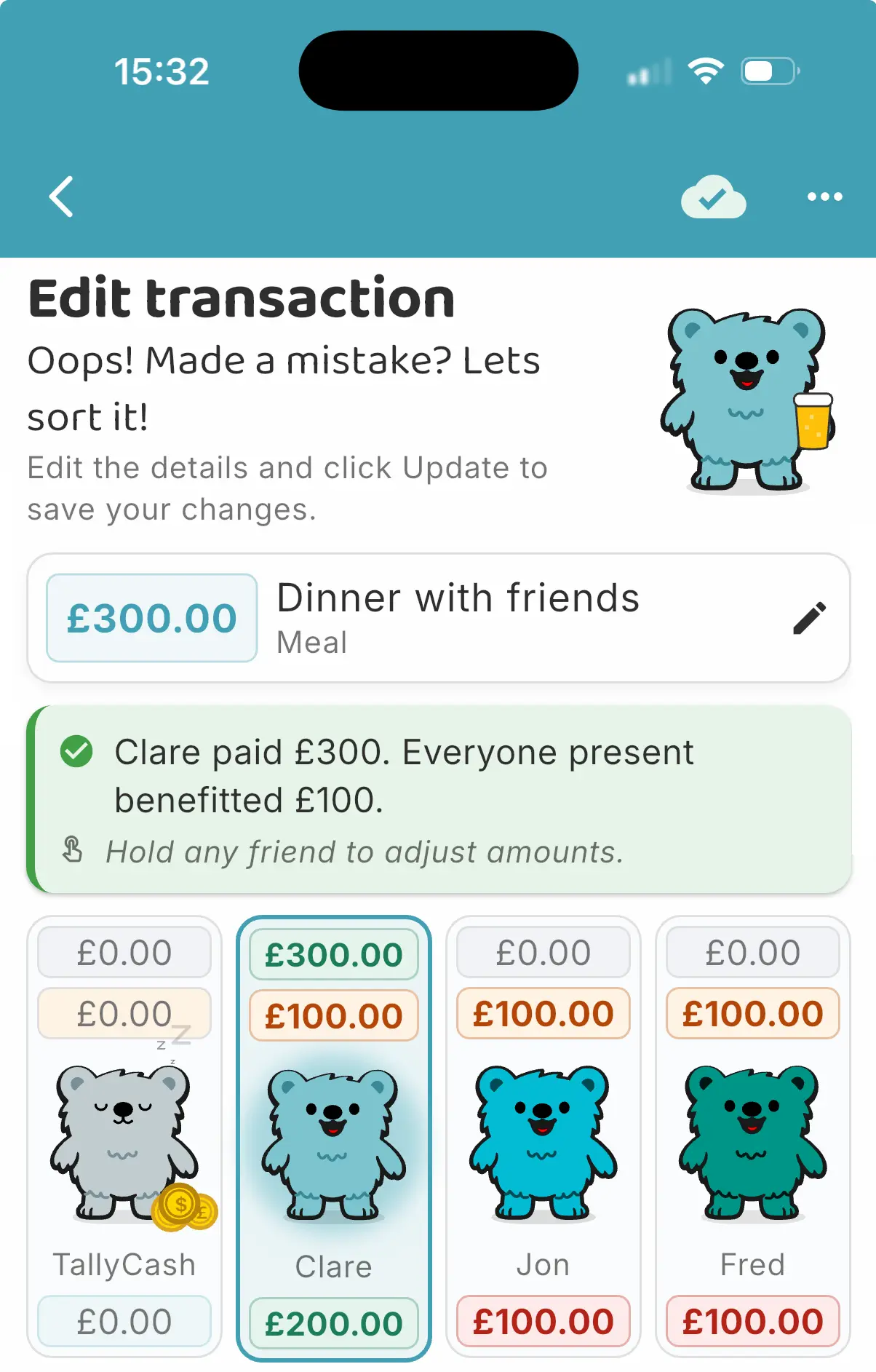
Simple, fair expense tracking in action
Does Tallykins like emojis in the app?
Go for it, in event names, friend names and transaction descriptions!! 😀😁🤣😗🥰
Do I need an account to use Tallykins?
No — you can use Tallykins without an account. Your data stays on your device. If you have the Organiser Pass, you can sign in with Google or Apple to securely back up your events and share them with friends — no passwords are shared with Tallykins.
Events & Transactions
How do I create an event?
From the home screen, tap “+ Event”. Add an event name and description. Add your friends, enter their name and choose their Tallykins. Save the event and then you can start adding transactions.
Need to group friends? Drag friends on to each other to create a group. Really useful for settlements later.
How do I edit an event?
From the home screen, tap edit. You can update the event name and description, add or remove friends and edit groups.
What types of transactions can I add?
You can add three types of transactions:
- Add Expense - Tap the add_circle_outline button on the Event to enter expense details. Tap the friends that paid, or tap TallyCash if it was paid from the cash kitty. Tap friends twice to exclude them from the transaction - one more tap to add them back in - easy 😁. Long press any friend to adjust amounts and shares.
- Tally up - Tap the balance button to record payments between friends and settle debts.
- Add Cash - Manage a cash kitty using Tallycash. Tap the add_circle_outline button on the left ear of Tallycash to add cash to the kitty. Then record an amount and log friend contributions.
How do I review the transactions I've recorded?
Tap the list_alt button to access the Activity screen. Here you can sort and view all activity for the event. If you've made any changes then these are accessible too.
If you have the Organiser Pass, you can also choose to view deleted transactions by tapping the history icon near the top of the screen.
I made a mistake, can I edit a saved transaction?
Yes, of course. Find the transaction in the Activity screen and tap to edit. You can also delete a transaction by tapping delete.
Can I share events with friends?
Yes. From the My Tallykins screen, tap the share share button on the relevant Event. You can share the summary using your preferred method - we use a WhatsApp message to our event group.
- Users with the Organiser Pass can also share the event with friends by tapping the person_add share with friends button. This allows the user to share a 6 digit code (valid for 1 hour) to friends with the Tallykins app. They simply tap 'I have a share code' on the Add Event screen to join the event. Free users can access shared events too!!
- Users with the Organiser Pass can also share a detailed PDF report - a great way to give everyone the low-down on a fun weekend away ✈️😎🏖️.
Currency support
Does Tallykins support different currencies?
Sure! Users have access to up to 29 exchange rates, which are normally updated each weekday. We use 'Frankfurter' to provide these rates.
Can I change my display currency?
Users can select their preferred display currency from their available currencies. All summaries are shown in the users display currency. Transaction details are always displayed in the selected transaction currency.
Organiser Pass Features👑
What do I get with the Organiser Pass?
- Share events with friends
- Manage larger groups (up to 20 people)
- Real-time syncing across devices
- Multiple active events
- Secure cloud backup
- Export clean PDF settlement summary and report
Is the Organiser Pass required?
No. You can use the free version of Tallykins as long as you like, but the Organiser Pass adds convenience and secure cloud backup.
Data & Privacy
See our Privacy Policy for details on data use.